How to Hide Personal Information in Photos: Mosaic vs. Blur
Published 2026-09-29
Everyday photos carry more personal information than most people realize: a shipping label on a package, a building number outside the window, a chat on a monitor, a friend's face in the background. These details are easy to miss when posting and can cause trouble later.
Check these before posting
- Names, addresses and phone numbers on shipping labels, receipts and mail
- Car license plates
- Faces of other people in the shot, especially children
- Chats, emails or account details visible on screens
- Building names, unit numbers or views that reveal where you live
- Numbers and barcodes on IDs, cards and boarding passes
Barcodes and QR codes on boarding passes and shipping labels can reveal names and booking details when scanned, even if no text is readable. Cover the codes as well.
Mosaic versus blur
A mosaic divides an area into large squares and fills each with a single color. A blur mixes each pixel with its neighbors to soften the area. Both hide information, but they behave differently.
| Mosaic | Blur | |
|---|---|---|
| Look | Clearly censored | Soft and natural |
| Best for | Plates, text, documents | Background people, faces, scenery |
| Watch out for | Small blocks keep the shape | Weak blur keeps the outline |
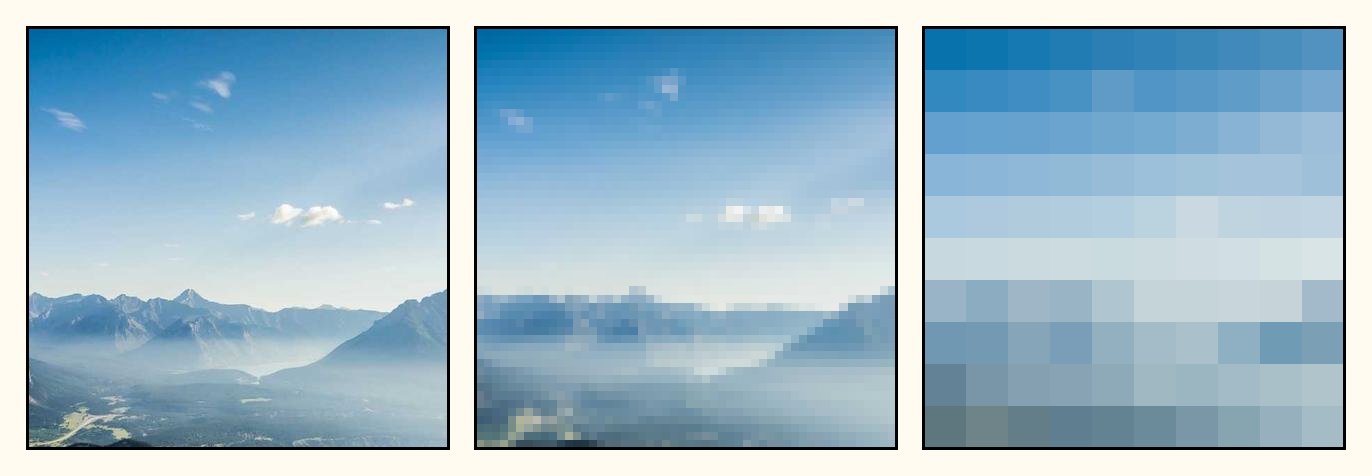
Weak mosaic and blur can be reversed
Lightly blurred text or a mosaic with small blocks is less safe than it looks, because enough of the original shape remains to make a guess. Tools that recover lightly pixelated text have been published openly.
- For text and numbers, make the mosaic blocks large enough that each character is swallowed by a single block.
- Apply blur strongly enough that outlines disappear completely.
- For information that must never leak, such as account or ID numbers, cover it fully with a sticker or solid shape.
- Make the covered area larger than the information itself. Even the edge of a character can give it away.
Hidden data inside the file: EXIF
Photos taken on a phone store invisible metadata called EXIF. Beyond the date and device model, it can include the GPS coordinates of where the photo was taken if location tagging is on. Most large social networks strip this on upload, but it can survive when files are sent through messengers, email or some forums.
Images saved from prezll are exported as a fresh file from what the browser drew on screen, so the original photo's EXIF data is not carried over. If location data worries you, pass the photo through prezll before sharing it.
How to do it in prezll
- Upload a photo and choose the Mosaic or Blur tool.
- Drag to mark each area to hide. You can add several areas and rotate each one.
- Raise the strength enough, then apply.
- To keep one person visible and hide everything else, turn on Invert selection so the area outside your selection is covered.
- Cover anything that must be fully hidden with a sticker, then download.
Your photo stays in your browser and is never sent to a server. The more sensitive the photo, the more it matters to use a tool that does not upload it anywhere.
Blur or pixelate a photoMore guides
- Social Media Image Sizes for 2026: Instagram, Threads and X
- 5 Ways to Reduce GIF File Size Without Ruining Quality
- JPG vs PNG vs WebP: Which Image Format Should You Use?